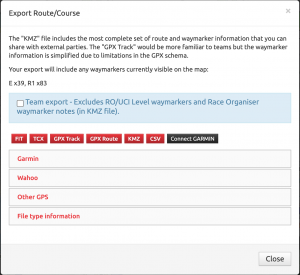
FIT: Compressed course file including waymarker information. Only file type now fully supported by Wahoo.
TCX: Standard text based file for describing a route including waymarkers. Usually the best file to use when transferring to GPS devices (apart from Wahoo).
GPX Track: Is the equivalent of a ride recording. GPS devices do not support waymarkers with this file format.
GPX Route: A planned route format including waymarker information. Not supported by many GPS devices but perhaps the only type supported by Bryton (although I’ve not had confirmation the process works fully at Bryton’s side).
KMZ: Best option for Race Organisers to share course and waymarker information. Fully viewable in Google Maps/Earth and other applications. Includes specific waymarker images for all types, colours and options along with full waymarker notes.
CSV: Raw output if latitude, longitude, elevation and distance.
GARMIN: Direct integration with Garmin Connect, pushes the route (including waymarkers) directly to your Garmin account.
Wahoo devices use a FIT file download which will include the Waymarker information (still based on the “TCX” visibility option on each waymarker). This FIT file can be loaded onto the Wahoo units using either the Wahoo phone app or via USB cable.
Garmin will support both FIT and TCX file types but still require the use of a USB cable (copying file to the Garmin/NewFiles folder). The Garmin Connect phone app will still strip out waymarkers from both TCX and FIT files and may also overwrite the elevation data with much less reliable data. So if you’re using Garmin head units, use the USB cable to get the routes onto the device. Putting pressure on your Garmin contact to support “custom cues” from FIT files (or TCX files) via the Garmin Connect app might help.