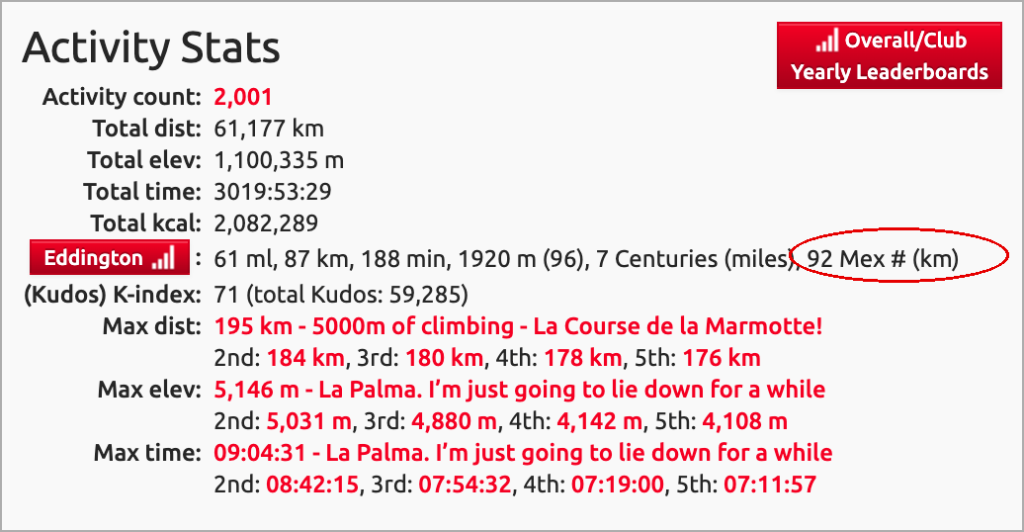
Eagle-eyed VeloViewer users will have spotted a new Mex metric sitting in your Activity Stats. So what is it, and how can you use it to have some fun, and set new challenges based on your Mex?
What does your Mex mean? A rider’s Mex is equal to the highest consecutive kilometre completed before their first missing distance. Users must complete one individual ride at every whole-kilometre distance in ascending order.
Where is it located in VeloViewer?
Your ‘Mex’ will appear on the Eddington row of the Activity Stats section of your Summary page.
How do you identify the gaps?
- Navigate to your Activities page where the ‘list’ view will show the details of all your rides – click the Distance column header to sort in ascending order.
- You can optionally filter your data setting the Distance to start at your current Mex value to more easily see what holes you need to plug in your data to increase your Mex.
The advent of this new VV metric is thanks to Finnish user Pekka after he requested it based on his own use and challenges he had set himself – read his story here.