Eagle-eyed VeloViewer users will have spotted a new Mex metric sitting in your Activity Stats. So what is it, and how can you use it to have some fun, and set new challenges based on your Mex?
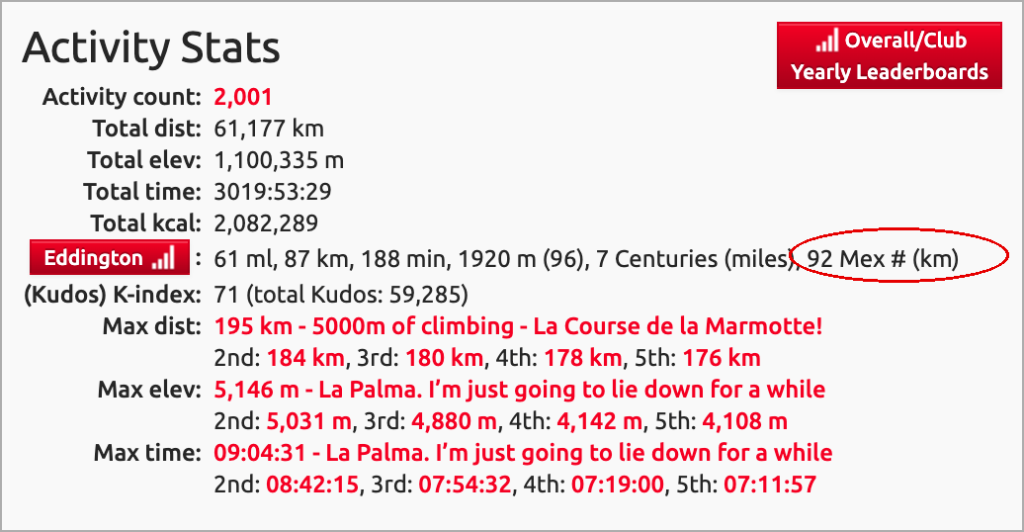
What does your Mex mean? A rider’s Mex (Minimum Excluded Value) is the first missing distance (full kilometres completed) in your Strava history.
Where is it located in VeloViewer?
Your ‘Mex’ will appear on the Eddington row of the Activity Stats section of your Summary page. In my data shown in the image, I have activities of every distance up to 91 km but I don’t have an activity between 92 km and 93 km, hence my Mex is 92 as that is the first distance I am missing in the sequence.
How do you identify the gaps?
- Navigate to your Activities page where the ‘list’ view will show the details of all your rides – click the Distance column header to sort in ascending order.
- You can optionally filter your data setting the Distance to start at your current Mex value to more easily see what holes you need to plug in your data to increase your Mex.
The advent of this new VV metric is thanks to Finnish user Pekka after he requested it based on his own use and challenges he had set himself – read his story here.
Nick says:
read the article about Pekka, great read, makes my tile hunting look seriously tame !!
as a user that is based in the UK and uses miles, i’m struggling to see an easy way to view my spread of rides beyond my current mex of 72
i will do a bit more digging, but cant see how to add a column to activities to show it in km or a way to change my units to km briefly and flip it back – do i need to change it in strava?
Nick says:
my bad, found it on the update page.
also found that my mex is 97, so better than i thought, reasonably easy path up to ~120
if this gains traction would be useful to have a quick click view, that did the filtering, sorting and units all in one