Waymarkers Panel
Clicking the Waymarkers button opens a panel on the right of the map that provides significant functionality for race preparations:
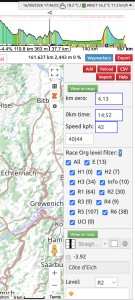
- Add / Reload – Click Add, to add a waymarker at a specific distance (alternative to right-clicking directly on the map). Once added, a prompt to save will be shown. Once saved, the Waymarkers list will need to be Reloaded to refresh the list. Once this is complete then any additional information can be added for example, optional colour plus any specific notes about the waymarker that may be useful to share. Otherwise, the waymarker will state the distance from the start (KM0 if applicable) or for KOM-related types the gradient and length of the climb is stated.
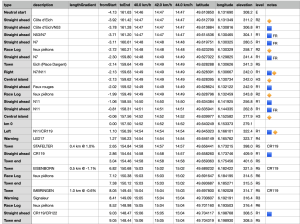
- CSV – This produces a CSV file that can be used for manipulation or print off and includes any additional notes and expected timings based on average speed set in the Waymarkers section. It can be manipulated in Excel and used in the production of a Roadbook.
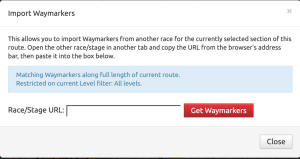
- Import – To copy waymarkers from one race/stage to another is possible using the Waymarker Import button. This could be from the same race the previous year, a different race that covered some or all of the same course, or even from one team’s Race Hub to another (if you have access to multiple Race Hubs, e.g. between the men’s and women’s if separate Race Hubs). They can also be copied from/to training camps. Step-by-step instructions can be found here.
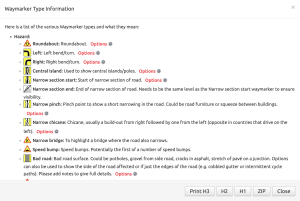
- Help – descriptions of each type of waymarker together with the different options for each. From here you can download all waymarker information in a ZIP file else print each category of waymarker.
- Setting km zero – The distance is defaulted to 0. If the value is set by the Race Organiser or VeloViewer it will be read-only for all other users. Otherwise, it can be set based on the roadbook but be aware that it will be shared across all users of VeloViewer WorldTour.
- Setting 0km time – The time is defaulted to 11:00. It is the time at which the race is expected to cross km zero. If the Race Organiser or VeloViewer sets the value, it will be read-only for all other users. This is stored only once and used across all users (in the same way as the km zero location).
- Speed kph – This is set as an estimated speed for the race based on previous race recordings. The second entry box is for the upper/lower speeds. These are used in the processing for roadbook download.
- Managing Waymarkers – Information on waymarker types and levels, their properties and filtering.
- Race Org Level Filters – Allows filtering of waymarkers based on their level.