Race Admin
The primary use of the Race Hub – Admin (known as Race Admin) page is for Teams to select the races they are planning to participate in during the season.
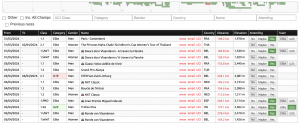
Filtered by year (select from the drop-down list) the calendar of races are populated from the UCI calendar and are kept regularly updated.
The graphic at the top shows a block calendar of your selected races and hovering over a block will display the high-level details of the race.
The colours used are:
- Green – selected (yes)
- Blue – provisionally selected (maybe)
- Red – cancelled (as per the UCI calendar)
This is followed by a set of search criteria and filters:
- Other – By default the list of races will be restricted based on the subscription level of your team(s) i.e. if your Race Hub is a women’s team then the default list will include only women’s races. If you are a national team then the default list will be the U23/U19 races. By checking this filter all UCI races in the calendar will display, most of which won’t be relevant to your team.
- Inc Champs – when selected will display National Championships
- UCI Class – select from list
- Category – select from Elite/U23/U19. All will be shown alongside any of these selections
- Gender – select from Men/Women/All/Blank
- Country – using a 3-character code
- Name – enter any part of the race name
- Attending – Yes/Maybe/No
- Previous Races – when selected will display all races within the season
- Team – only visible if multiple teams are in a single Race Hub
The default calendar list will display the races in chronological order. In addition to the search criteria above, this list displays:
- Distance – if this column is populated it means the race routes have been added to VV WT. If not populated, then no information has yet been received so please email it to worldtour@veloviewer.com if you have it. Clicking on the red Distance total will open a popup with the race stage details:
If this is a race you are able to add to your Race Hub then the date(s) will be red links to allow viewing of the route details. Go back to the list by closing the window (x).
- Elevation – displayed if the route has been added to VV WT.
- Attending – allows selection or deselection of races that will appear in the Race Hub.
- Yes adds it immediately to your Race Hub.
- Maybe to add the race as provisional to your calendar but does not appear in your Race Hub.
- No will remove the race from the Race Hub if it was previously set to Yes and will unselect a Maybe.
- Request means the race falls outside of your team subscription. This will open a pre-populated email to worldtour@veloviewer.com with the details of the race to add. If you press send, the race will be added for the additional cost agreed at the start of each season.
- Team – visible if your Race Hub is set up to include races for both your Elite and Development (U23) team. The Elite/U23 button toggle is displayed on races that could be applicable to both teams so it can be marked which team will be participating. This isn’t shown for WorldTour or U23 races.