Upcoming Races – Summary
When a race is expanded in the Upcoming Races, by clicking on it, for each race/stage the following is displayed:
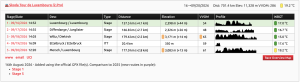
- Stage/Date – stage number and date – click the date to show the route details plus the start time if it has been set.
- Desc – description will be blank for one day races but state the start / end towns for multi-stage races.
- Type – Stage, Prologue, ITT, TTT, One Day.
- Distance – in kilometres with neutralised distance in brackets (where known).
- Elevation – reliable elevation total based on corrected elevation data.
- VVOM (VeloViewer Objective Measure) – a calculation used to provide an overall rating of difficulty for each standalone route.
- Profile – a small profile of each stage relative in size to the other stages of the same race.
- WBGT ( Wet Bulb Globe Temperature) – a calculation to indicate the maximum temperature during the race/stage.
Amber and red warning markers are shown for Distance, Elevation and VVOM values that are at the more extreme end of the scale.
Below the list for each race in your Race Hub there is:
Race Organiser / UCI Links – Links to Race Organiser website (www) / email details / UCI website for race (VV are not responsible for any errors with these as they are supplied by UCI)
Single Race Live App Link – share your race with people who are not users in your Race Hub but may be helping out on the day e.g. VIP drivers etc
Race Overview Map – a pop-up showing a map of all the stages of that race
Receive Updates / Email Notifications
Opting in for email notifications for race route updates.
- Ensure current email address populates the field at the top of the Race Hub .
- Receive updates – check this to receive any updates for this race (when added and any subsequent updates). It will also show a 🔔 next to the race name to make it clear which races you have selected.
Notes – An audit log of when the race was added/updated, any special remarks, similarities to previous years, images to highlight changes.